> ## Documentation Index
> Fetch the complete documentation index at: https://docs.quantumheaps.com/llms.txt
> Use this file to discover all available pages before exploring further.
# Workspace & Team Settings
**Overview:-** Workspace & Team Settings is where you manage your organization's business details and see who's part of your workspace — the company-level configuration that applies across every module, rather than settings specific to one.
### **Where to Find It**
1. Click the **Settings** icon in the bottom-left corner
2. Select **Workspace & Teams** from the sidebar
 ### **Team Members**
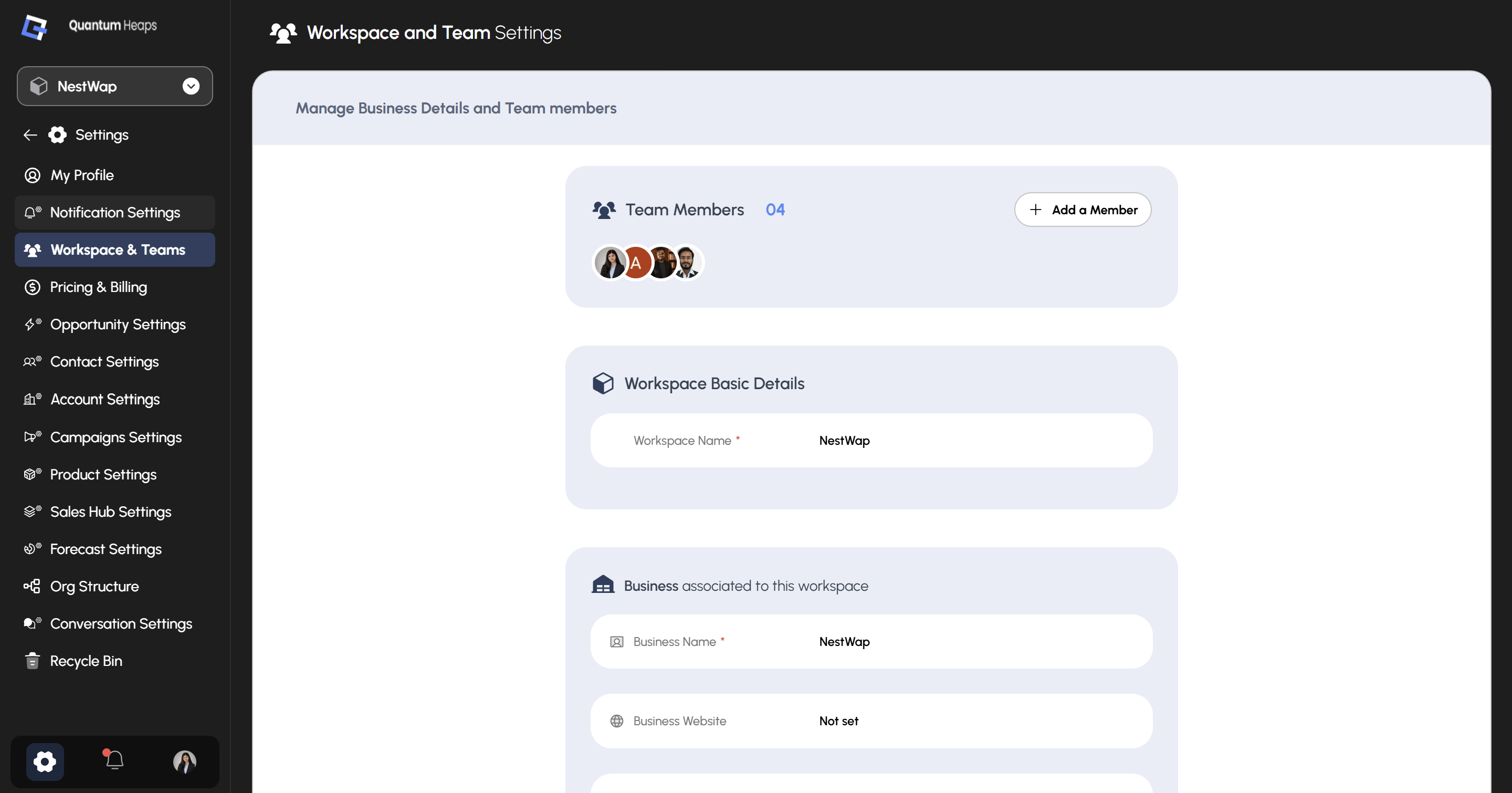
At the top of the page, **Team Members** shows a running count of everyone in your workspace, with avatars for each person. Click **+ Add a Member** to invite someone new to the workspace.
### **Workspace Basic Details**
This section holds the core identity of your workspace:
| **Field** | **Description** |
| :----------------- | :--------------------------------------------------------------------------------------------- |
| **Workspace Name** | The name of your workspace (required) — shown throughout the app and in the workspace switcher |
### **Business Associated to This Workspace**
This section captures details about the company the workspace belongs to:
| **Field** | **Description** |
| :--------------------- | :-------------------------------------------------------------------------------------------------------------------------------- |
| **Business Name** | Your company's name (required) |
| **Business Website** | Your company's website URL |
| **Business Logo** | Uploaded logo for your business |
| **Business Email** | A general contact email for the business |
| **Business Phone** | A general contact phone number |
| **Industry** | The industry your business operates in |
| **Fiscal Year Period** | The start and end of your fiscal year (e.g., 01 January – 31 December) — this drives period selectors elsewhere, like in Forecast |
| **Week Start Day** | The day your working week begins (e.g., Monday) — used for weekly period calculations |
| **Default Time Zone** | The workspace's default time zone (e.g., UTC) |
| **Default Currency** | The currency used across the workspace (e.g., \$ USD) |
| **Employee Size** | Your company's headcount range (e.g., 1–10 employees) |
Fields showing **Not set** haven't been filled in yet — click into any field to add or update it.
### **Team Members**
At the top of the page, **Team Members** shows a running count of everyone in your workspace, with avatars for each person. Click **+ Add a Member** to invite someone new to the workspace.
### **Workspace Basic Details**
This section holds the core identity of your workspace:
| **Field** | **Description** |
| :----------------- | :--------------------------------------------------------------------------------------------- |
| **Workspace Name** | The name of your workspace (required) — shown throughout the app and in the workspace switcher |
### **Business Associated to This Workspace**
This section captures details about the company the workspace belongs to:
| **Field** | **Description** |
| :--------------------- | :-------------------------------------------------------------------------------------------------------------------------------- |
| **Business Name** | Your company's name (required) |
| **Business Website** | Your company's website URL |
| **Business Logo** | Uploaded logo for your business |
| **Business Email** | A general contact email for the business |
| **Business Phone** | A general contact phone number |
| **Industry** | The industry your business operates in |
| **Fiscal Year Period** | The start and end of your fiscal year (e.g., 01 January – 31 December) — this drives period selectors elsewhere, like in Forecast |
| **Week Start Day** | The day your working week begins (e.g., Monday) — used for weekly period calculations |
| **Default Time Zone** | The workspace's default time zone (e.g., UTC) |
| **Default Currency** | The currency used across the workspace (e.g., \$ USD) |
| **Employee Size** | Your company's headcount range (e.g., 1–10 employees) |
Fields showing **Not set** haven't been filled in yet — click into any field to add or update it.