> ## Documentation Index
> Fetch the complete documentation index at: https://docs.quantumheaps.com/llms.txt
> Use this file to discover all available pages before exploring further.
# Opportunity Settings
Opportunity Settings is where admins configure everything that shapes how opportunities work across your workspace — which fields appear, how your pipeline is structured, what has to happen before a deal can move stages, and how deal health gets measured.
### **Where to Find It**
1. Click the **Settings** icon in the bottom-left corner
2. Select **Opportunity Settings** from the sidebar
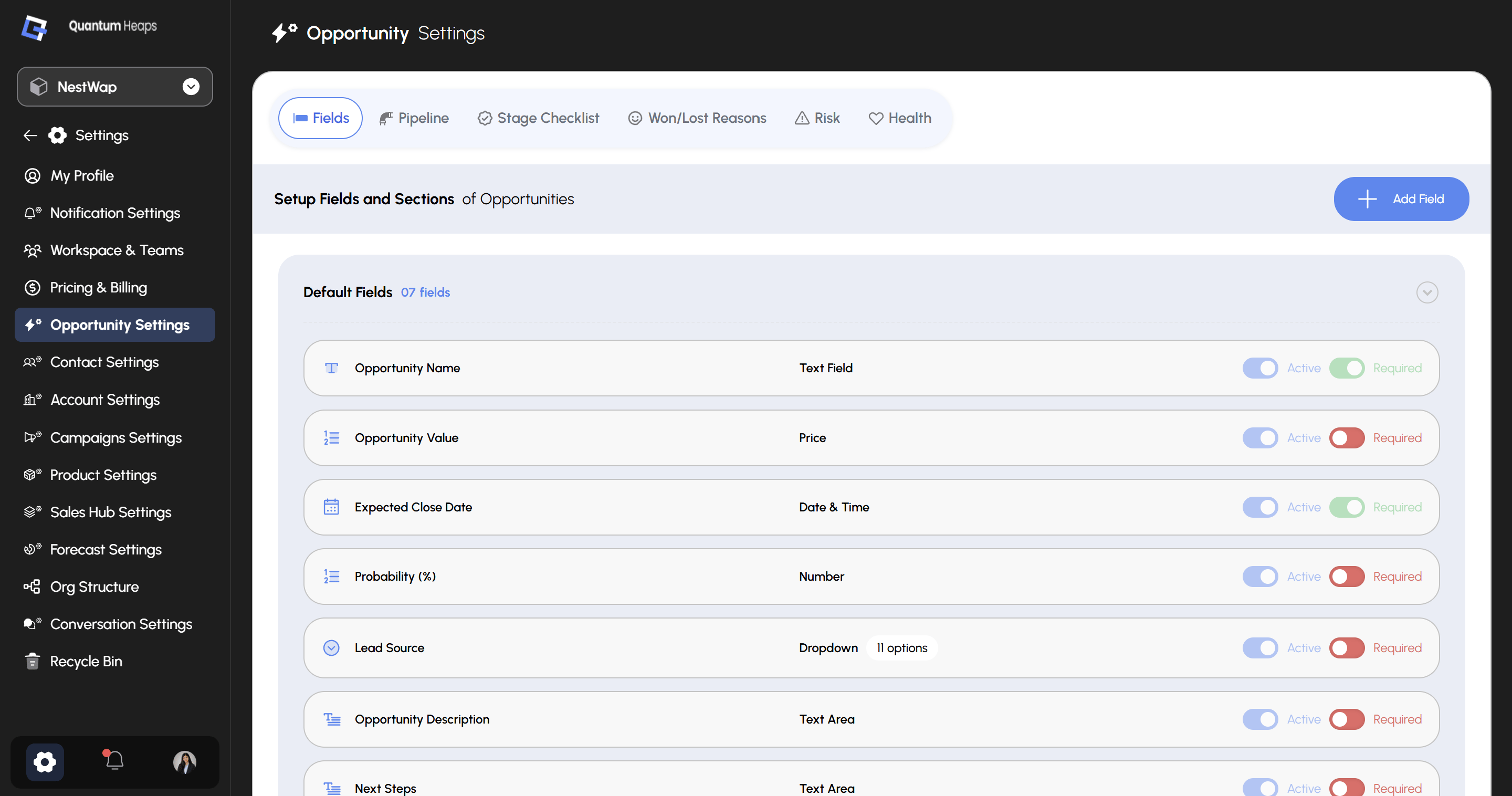 Six tabs sit across the top: **Fields**, **Pipeline**, **Stage Checklist**, **Won/Lost Reasons**, **Risk**, and **Health**.
### **Fields**
The **Fields** tab controls which fields appear on every opportunity form and detail page. **Default Fields** shows your 7 built-in fields, each with two independent toggles:
| **Toggle** | **Controls** |
| :----------- | :--------------------------------------------------------------- |
| **Active** | Whether the field is visible on forms and the detail page |
| **Required** | Whether the field must be filled in before saving an opportunity |
| **Field** | **Type** | **Notes** |
| :-------------------------- | :---------- | :------------------------------------------ |
| **Opportunity Name** | Text Field | Active, Required |
| **Opportunity Value** | Price | Active, not Required |
| **Expected Close Date** | Date & Time | Active, Required |
| **Probability (%)** | Number | Active, not Required |
| **Lead Source** | Dropdown | Active, not Required — 7 options configured |
| **Opportunity Description** | Text Area | Active, not Required |
Click **+ Add Field** to create a custom field beyond the defaults — you'll set its section, field type, and required status, and can configure field-level permissions per role at the same time.
###
Six tabs sit across the top: **Fields**, **Pipeline**, **Stage Checklist**, **Won/Lost Reasons**, **Risk**, and **Health**.
### **Fields**
The **Fields** tab controls which fields appear on every opportunity form and detail page. **Default Fields** shows your 7 built-in fields, each with two independent toggles:
| **Toggle** | **Controls** |
| :----------- | :--------------------------------------------------------------- |
| **Active** | Whether the field is visible on forms and the detail page |
| **Required** | Whether the field must be filled in before saving an opportunity |
| **Field** | **Type** | **Notes** |
| :-------------------------- | :---------- | :------------------------------------------ |
| **Opportunity Name** | Text Field | Active, Required |
| **Opportunity Value** | Price | Active, not Required |
| **Expected Close Date** | Date & Time | Active, Required |
| **Probability (%)** | Number | Active, not Required |
| **Lead Source** | Dropdown | Active, not Required — 7 options configured |
| **Opportunity Description** | Text Area | Active, not Required |
Click **+ Add Field** to create a custom field beyond the defaults — you'll set its section, field type, and required status, and can configure field-level permissions per role at the same time.
###
**Pipeline**
The **Pipeline** tab is where you build your sales process itself:
1. Click **Add Pipeline** to create a new pipeline
2. Click into a pipeline to view and manage the stages inside it
3. Click **Add Stage** to add a stage, and mark whether it should count toward forecast consideration
### **Stage Checklist**
Use **Stage Checklist** to require certain conditions before a rep can move an opportunity to the next stage:
1. Select a pipeline
2. Click **Add Checklist**
3. Enter the checklist question, the opportunity field it checks, a condition operator, and a condition value
4. Toggle **Active** and **Required** for the checklist item
This blocks a stage change until the required criteria are satisfied.
### **Won/Lost Reasons**
Define the reasons reps choose from when they close a deal:
1. Select a pipeline
2. Click **Add New** under either **Won Reason** or **Lost Reason**
3. Edit a reason using the pen icon, or delete it with the trash icon
These reasons appear when a rep marks an opportunity Won or Lost from the opportunity detail page.
### **Risk**
Turn on the risk signals you want tracked across your pipeline:
* Stage-based risk
* Risk based on a past close date
* Risk based on an upcoming close date
* Risk based on no conversation
* Risk based on no activity
* Risk based on contact roles
Click **Save Settings** once you've activated the ones relevant to your team.
### **Health**
Choose how your team measures deal qualification — **MEDDPICC**, **MEDPIC**, or **BANT**. This is a workspace-wide setting, so every rep scores opportunity health the same way.