> ## Documentation Index
> Fetch the complete documentation index at: https://docs.quantumheaps.com/llms.txt
> Use this file to discover all available pages before exploring further.
# Forecast Settings
\*\*Overview:-\*\*Forecast Settings is where admins configure how revenue forecasting works across the workspace — connecting your actual pipeline stages to the forecast categories your team sees on the Forecast page, plus setting quotas for each person.
### **Where to Find It**
1. Click the **Settings** icon in the bottom-left corner
2. Select **Forecast Settings** from the sidebar
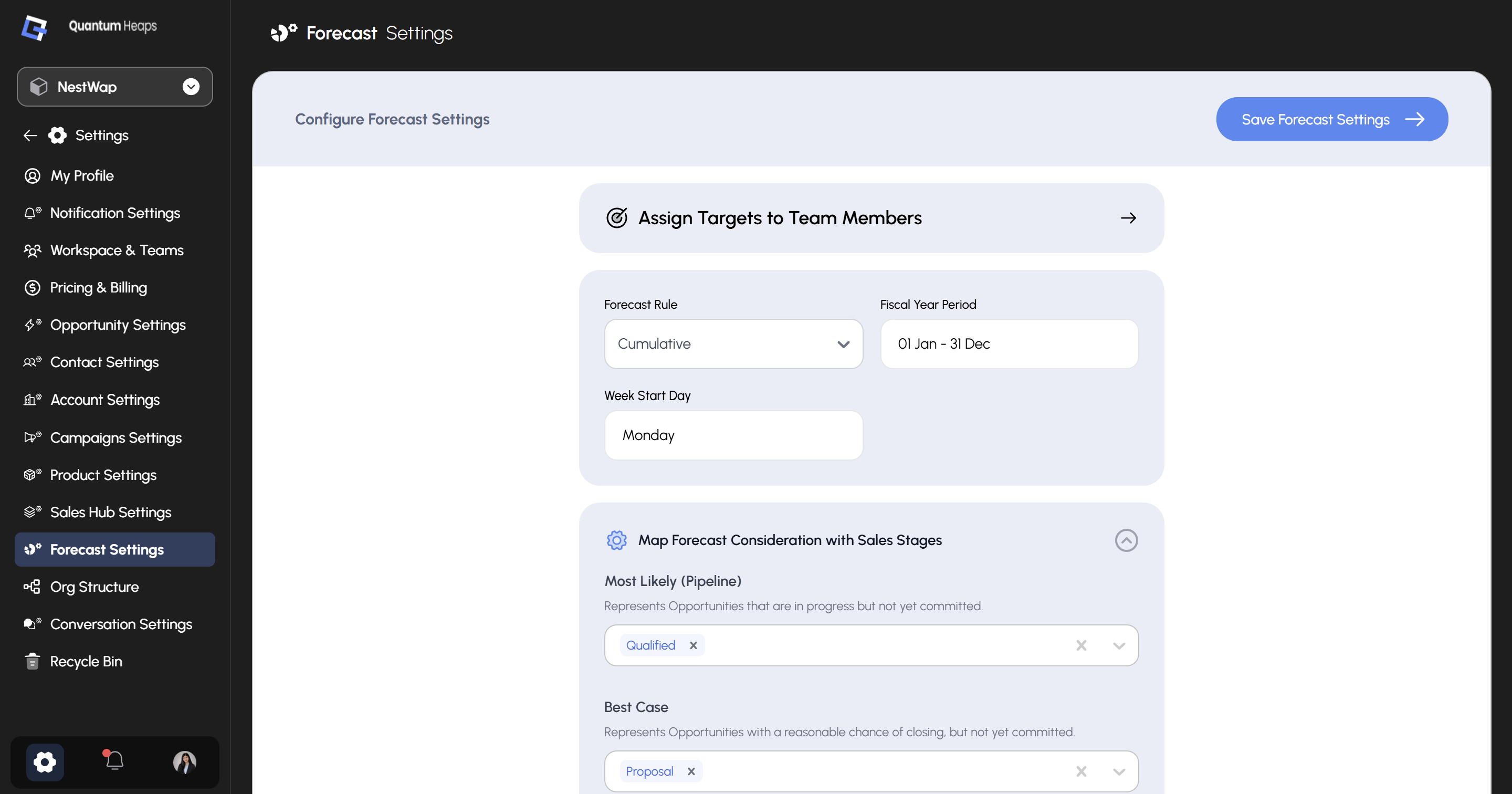 ### **Assign Targets to Team Members**
At the top of the page, click **Assign Targets to Team Members →** to open the target assignment screen, where you set individual quota targets for each person for the current fiscal period.
### **Global Configuration**
| **Setting** | **Description** |
| :--------------------- | :------------------------------------------------------------------------------------------------------------------------------------------------------- |
| **Forecast Rule** | Dropdown — Cumulative or Standard. Defines how forecast values roll up across the reporting hierarchy |
| **Fiscal Year Period** | The start and end date of your fiscal year (e.g., 01 Jan – 31 Dec) — determines which periods appear in the quarter/month selectors on the Forecast page |
| **Week Start Day** | The day your working week begins (e.g., Monday) — used for weekly period calculations |
###
### **Assign Targets to Team Members**
At the top of the page, click **Assign Targets to Team Members →** to open the target assignment screen, where you set individual quota targets for each person for the current fiscal period.
### **Global Configuration**
| **Setting** | **Description** |
| :--------------------- | :------------------------------------------------------------------------------------------------------------------------------------------------------- |
| **Forecast Rule** | Dropdown — Cumulative or Standard. Defines how forecast values roll up across the reporting hierarchy |
| **Fiscal Year Period** | The start and end date of your fiscal year (e.g., 01 Jan – 31 Dec) — determines which periods appear in the quarter/month selectors on the Forecast page |
| **Week Start Day** | The day your working week begins (e.g., Monday) — used for weekly period calculations |
###
**Map Forecast Consideration with Sales Stages**
This is the core of Forecast Settings — it connects your opportunity pipeline stages to the categories shown in the forecast table. Each category has a multi-select stage picker; click the **×** on any pill to remove a stage, or use the dropdown to add one.
| **Category** | **What it represents** | **Configured stages** |
| :------------------------- | :----------------------------------------------------------------------- | :-------------------- |
| **Most Likely (Pipeline)** | Opportunities in progress but not yet committed | Qualified |
| **Best Case** | Opportunities with a reasonable chance of closing, but not yet committed | Proposal |
| **Committed** | Opportunities reps are confident will close in the forecast period | Negotiation |
| **Booked** | Opportunities that have been won | Closed Won |
| **Omitted** | Opportunities excluded from the forecast entirely | New Lead, Closed Lost |
Once you've adjusted the mappings, click **Save Forecast Settings** at the top right to apply all changes.