> ## Documentation Index
> Fetch the complete documentation index at: https://docs.quantumheaps.com/llms.txt
> Use this file to discover all available pages before exploring further.
# Campaigns Settings
\*\*Overview:-\*\*Campaigns Settings is where admins configure the fields, stages, and tags used across the Campaign module — right now shown scoped to **Events**, one of Campaigns' five sub-modules (Leads, Events, Email Sequences, Forms, Settings).
### **Where to Find It**
1. Click the **Settings** icon in the bottom-left corner
2. Select **Campaigns Settings** from the sidebar
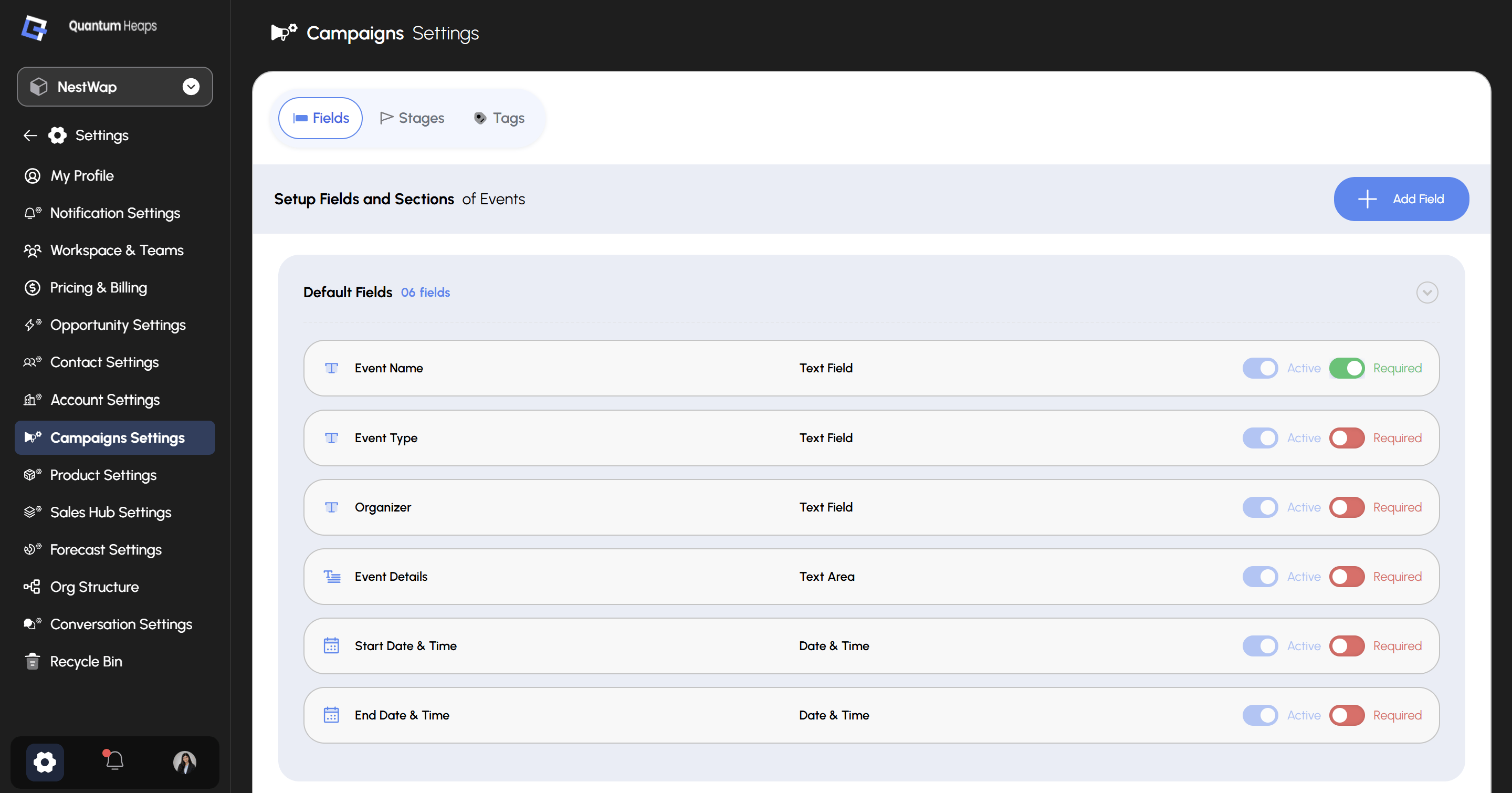 Three tabs sit across the top: **Fields**, **Stages**, and **Tags**.
### **Fields**
The **Fields** tab controls which fields appear on Campaign forms and detail pages — currently showing **Setup Fields and Sections of Events**. **Default Fields** shows 6 built-in fields, each with two independent toggles:
| **Toggle** | **Controls** |
| :----------- | :-------------------------------------------------------- |
| **Active** | Whether the field is visible on forms and the detail page |
| **Required** | Whether the field must be filled in before saving |
Three tabs sit across the top: **Fields**, **Stages**, and **Tags**.
### **Fields**
The **Fields** tab controls which fields appear on Campaign forms and detail pages — currently showing **Setup Fields and Sections of Events**. **Default Fields** shows 6 built-in fields, each with two independent toggles:
| **Toggle** | **Controls** |
| :----------- | :-------------------------------------------------------- |
| **Active** | Whether the field is visible on forms and the detail page |
| **Required** | Whether the field must be filled in before saving |
| **Field** | **Type** | **Notes** |
| :-------------------- | :---------- | :------------------- |
| **Event Name** | Text Field | Active, Required |
| **Event Type** | Text Field | Active, not Required |
| **Organizer** | Text Field | Active, not Required |
| **Event Details** | Text Area | Active, not Required |
| **Start Date & Time** | Date & Time | Active, not Required |
| **End Date & Time** | Date & Time | Active, not Required |
Click **+ Add Field** to create a custom field beyond the defaults — you'll select its section and field type, and can set field-level permissions per role at the same time.
Field order set here persists and is reflected everywhere the field is displayed.
### **Stages**
Use the **Stages** tab to define and manage the stages your Campaign records move through — the same pattern as Contacts and Accounts: add a stage, reorder with the drag handle, and edit or delete from the 3-dot menu.
### **Tags**
Use the **Tags** tab to create and manage tags available across Campaigns — useful for categorizing leads, events, and sequences beyond what stages and fields capture.